1. Cotality
  2. Solution home
  3. Mitigate Mobile
  4. Basic Navigation

Editing Loss Details in Mitigate

Question

  • How do I edit the address, customer name, phone number from  in the Mitigate app?
  • How do I add source of loss, structure details or year built in Mitigate?
  • How do I edit the loss or assignment details in Mitigate?


Answer


Mitigate: Updating Assignment Details

Updating assignment details is essential for maintaining accurate records and ensuring smooth operations. Follow these simple steps to complete the process efficiently.


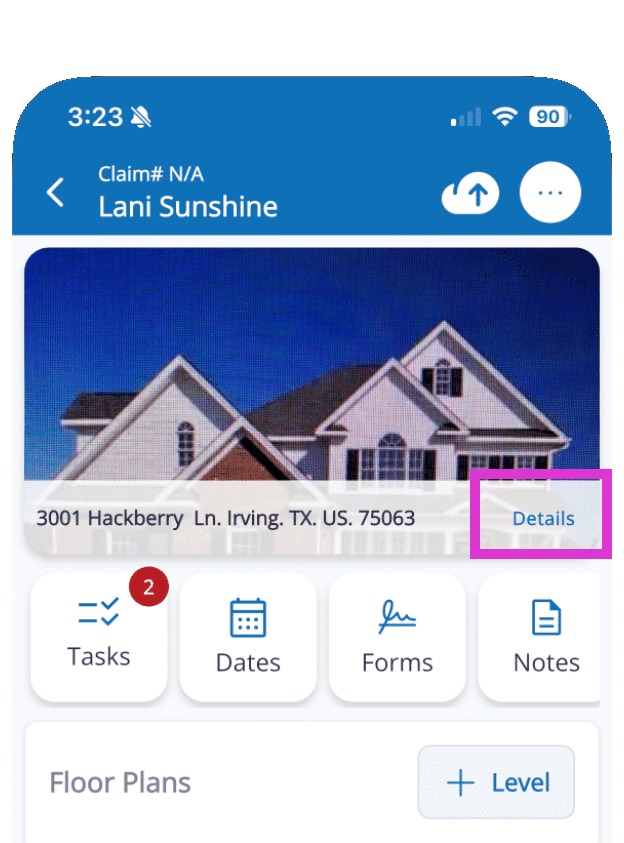
1. Tap Details

Tap Details located next to the customer's name and the address for the job.

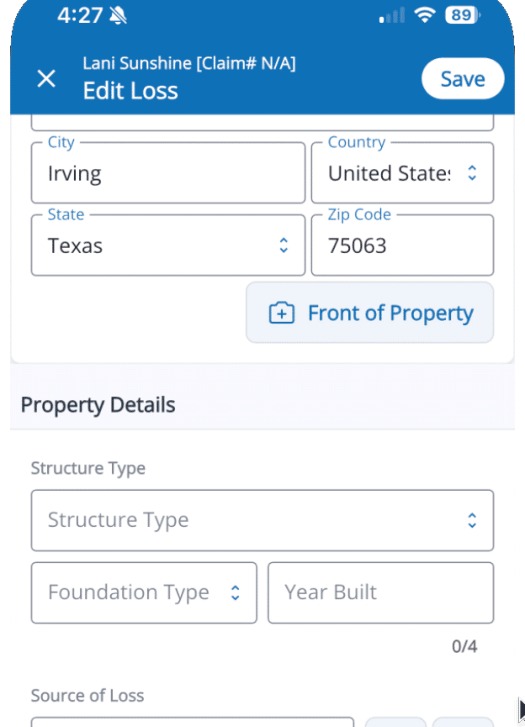
2. Make Changes

Make changes to the loss details, address, or customer contact information. This will ensure all legal documents, such as the Work Authorization, pre-populate with the correct information.

Note: You may need to scroll down in the app to access all sections.

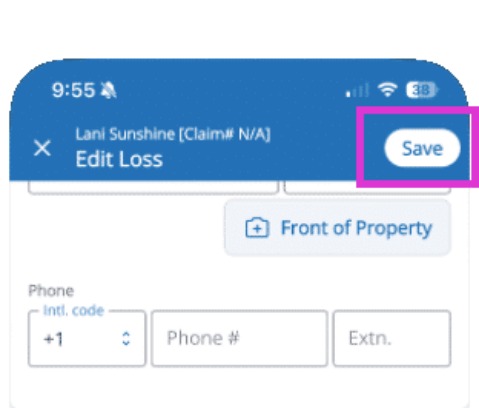
3. Save

Tap the Save button in the top right of the screen to record your changes.

Tip: That concludes the process for updating Assignment Details in Mitigate.

Questions? Contact Us!


Was this article helpful?

That’s Great!

Thank you for your feedback

Sorry! We couldn't be helpful

Thank you for your feedback

Let us know how can we improve this article!

Select at least one of the reasons
CAPTCHA verification is required.

Feedback sent

We appreciate your effort and will try to fix the article