How do I add offsets to my LiDAR scan in Mitigate™?
My LiDAR scan is missing offsets.
How do I add a fireplace or shelves to my LiDAR scan sketch?
Answer
Mitigate: LiDAR Scanning - Offsets & Obstacles
LiDAR cannot detect certain architectural features. Keep the following limitations in mind: Fireplaces, shelves, and cabinets are not detected; Offsets or insets greater than 18 inches must be added manually in Room Details; Accurate adjustments help ensure compliance with the S500 standard. Follow this guide for manually accounting for offsets or insets greater than 18 inches.
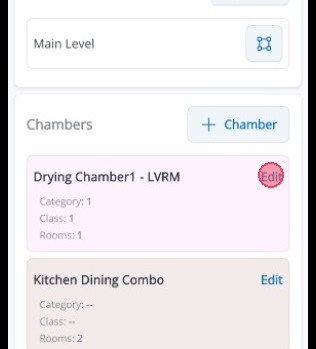
1. Tap Edit for the room to set any offsets or insets.
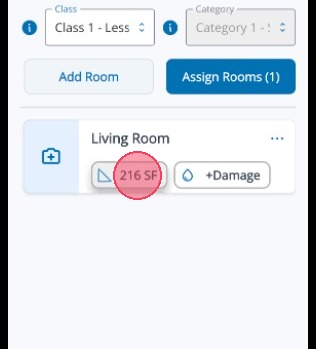
2. Tap the Room Measurements button to enter new dimensions
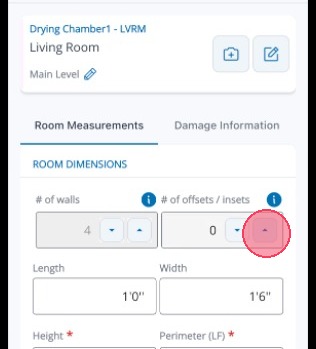
3. Set the number of offsets/insets for the room
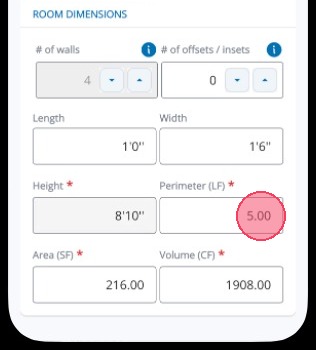
4. Tap into the Perimeter field to edit it.
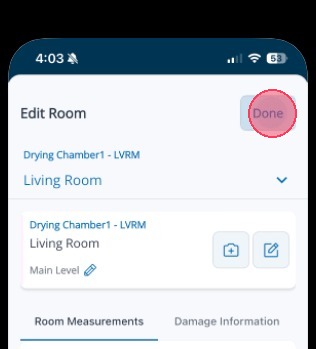
5. Tap Done to save the changes.
Tip: This concludes the process for manually setting the number of offsets/insets for a room.