
Question
- How to turn off notification emails for MICA / Mitigate?
- How to turn on notification emails for MICA?
- How can I customize the types of notification emails I receive from MICA?
- How to disable MICA emails?
- How to remove MICA notifications?
Security Tokens
The MICA system allows users to receive email notifications regarding various job updates. Follow the steps below to add/remove MICA notification emails:
- NOTE: you must have administrative access to MICA Exchange website in order to turn on/off MICA notification emails
- Navigate to the MICA website
- Click on Administrative Tasks
- Select User Management
- Search for the user that you want to turn on/off notifications for
- Once you've located their profile, click View/Set Permissions on the right
- Select the Tokens tab
- Click the Select Token Group dropdown and choose Email Subscription
- Here you will be able to see all the email notification options
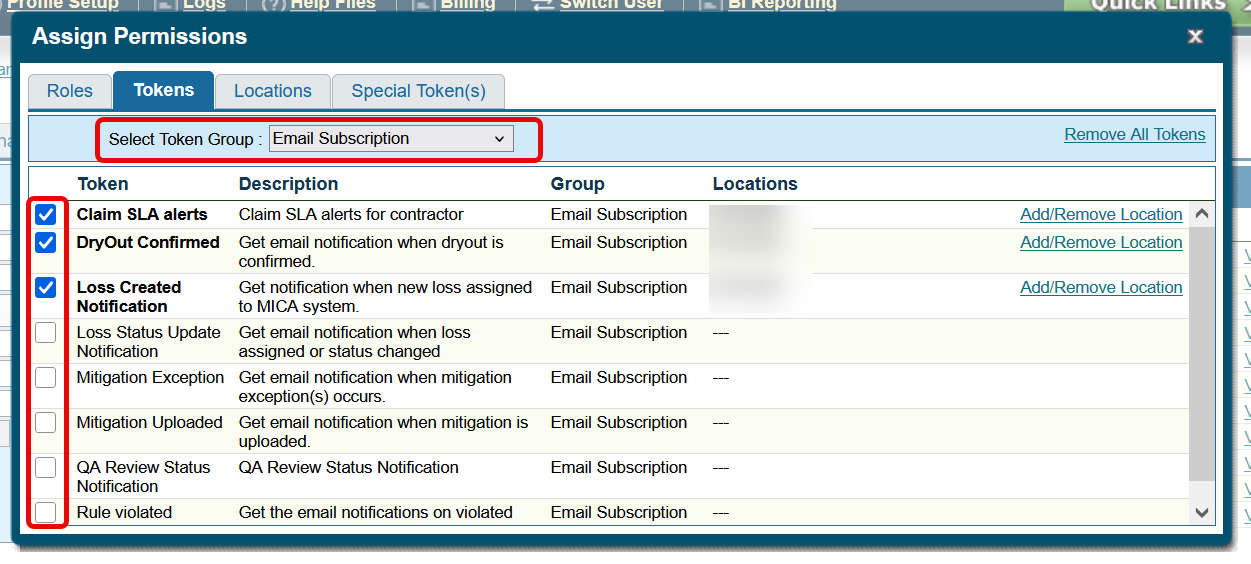
- Add or remove notification options accordingly
- Still not receiving emails? Ensure your email on your profile is up to date. Also check your Junk, Spam, Deleted folders as well as any Email Rules you may have created to filter out MICA notifications.
Safelist our domain and IPs
If you still do not get notifications, safelist the following email and IP addresses (if you are unsure how to do this, reach out to your IT or Google search "How to safelist emails and IP addresses for [enter your email provider here]".
- 50.31.62.128 - micaexchange.com
Questions? Contact Us!