1. Cotality
  2. Solution home
  3. Mitigate Mobile
  4. Project Layout

Changing Room level in Mitigate

Question

  • How do I move rooms to a different level in Mitigate™?
  • How do I move rooms to a different floor in Mitigate?
  • How do I move rooms on my Project Layout?
  • Changing the level of a room in a Mitigate loss


Answer

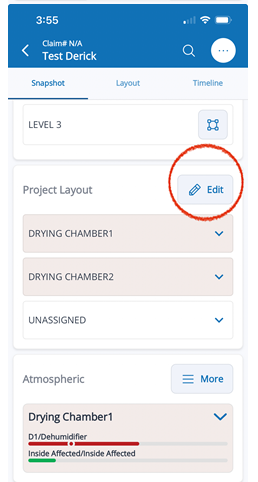
  1. Navigate to the Snapshot View of your project. Click Edit next to Project Layout.
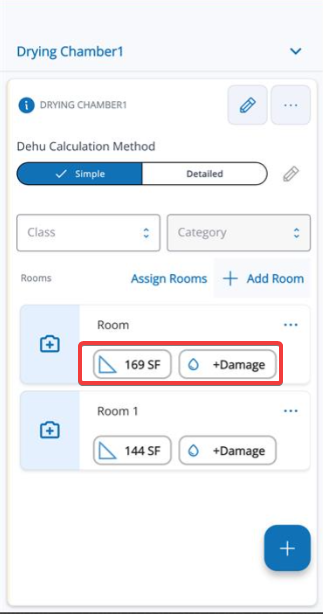
  2. Select either the Dimension or Moisture Content options.
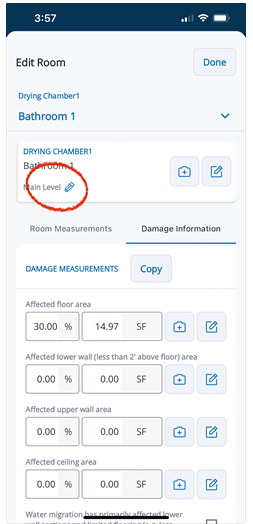
  3. Select the Pencil Icon
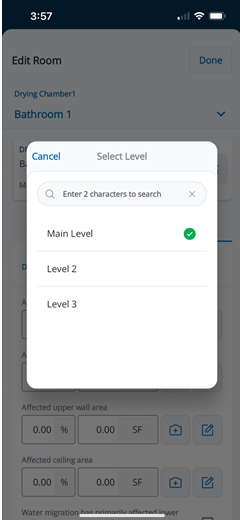
  4. Choose the desired level


Questions? Contact Us!


Was this article helpful?

That’s Great!

Thank you for your feedback

Sorry! We couldn't be helpful

Thank you for your feedback

Let us know how can we improve this article!

Select at least one of the reasons
CAPTCHA verification is required.

Feedback sent

We appreciate your effort and will try to fix the article